
Short answer: PepoChat is the best AI chatbot trained on your website data for most small teams in 2026: it crawls up to 200 pages, re-syncs them weekly, reads PDFs, Word files, Notion and Google Drive, and says it does not know instead of guessing, with 100 AI replies a month free and paid plans from $39. Pick CustomGPT.ai or DocsBot for large cited document sets, SiteGPT for very large sites, or My AskAI if your team works in Zendesk or Intercom.
- "Trained" means retrieval at answer time, not a retrained model.
- Most bad answers come from blocked pages, stale copies and scanned PDFs.
- Automatic re-sync ranges from manual-only to daily.
If you build or maintain websites, someone has asked you for an AI chatbot trained on your website data: point a tool at the domain, wait a few minutes, and visitors get answers drawn from your own pages. The demo always works. Whether it keeps working depends on plumbing most product pages never describe.
This comparison is for developers and whoever owns the company website: how retrieval works, what breaks it, and how ten hosted tools handle crawling, parsing, re-syncing and unanswerable questions.
For every tool we read the pricing page, knowledge-base docs and help center on 24 November 2026, comparing crawl limits, accepted file types, automatic re-sync, Notion and Google Drive connectors, fallback behavior, human handoff and price. Where a vendor does not publish a detail, the tables say so.
How an AI chatbot trained on your website data actually works
It does not study your website like a new hire; it searches your content every time someone asks, then answers from what the search returned. The technique is called retrieval-augmented generation (RAG): a language model is handed passages pulled from your own documents and told to answer from them. It was set out in a 2020 paper, Retrieval-Augmented Generation for Knowledge-Intensive NLP Tasks, and PepoChat keeps a short plain-English definition of RAG for client conversations.
The five steps behind every answer
- Crawl. The tool fetches pages from a start URL, a sitemap or a list of links and strips menus, footers and cookie banners. Each site, file or connected workspace you add is a knowledge source.
- Chunk. Long pages are cut into passages small enough that one passage can answer one question.
- Embed. Each chunk becomes an embedding, a list of numbers that captures its meaning, stored in a vector index.
- Retrieve. The visitor's question is embedded the same way, and the closest chunks are pulled out, sometimes re-ranked.
- Answer. The model writes a reply from those chunks. Keeping it inside them is called grounding, and when nothing relevant comes back, a well-configured agent says so instead of improvising.
Why it is not model training
Adding your site fills a search index; the language model underneath stays the same. Chatbase's docs put it plainly: a new source goes live within seconds, with no retrain button. Updates are cheap, deletions work, and because the model's general knowledge still sits underneath, the agent's instructions must keep it inside your content.
What breaks a website-trained chatbot?
Almost every wrong or empty answer traces back to the index, not the model: the right text never got in, or an outdated version did.

- Pages the crawler cannot reach. Login walls, bot protection and firewalls return a block page instead of content; Dante AI's knowledge docs list each case, and Chatbase's data-source guide asks you to allow its crawler in robots.txt. PepoChat's crawl respects robots.txt, while SiteGPT's docs say its crawler ignores it.
- Text that only JavaScript renders. If prices appear only after scripts run, a plain fetcher sees an empty shell. CustomGPT.ai's crawl docs name JavaScript-heavy sites among the reasons pages go missing.
- Stale copies. An index is a snapshot: refresh monthly and the bot quotes last month's refund policy.
- PDFs that are pictures of text. A scanned PDF has no text layer. Chatbase trains only on selectable text; SiteGPT and Dante AI run OCR on scans and images.
- Conflicting versions. An old PDF and a new page with different prices give retrieval two plausible answers.
- Plan limits. Some tools stop indexing at a page or character allowance, and the pages after that point are simply not learned.
Knowledge sources compared: crawl limits, files, re-sync and fallbacks
This table puts the retrieval details side by side, read from each vendor's pricing page and help docs. Limits come in different units, so compare them against the real size of your content.
| Tool | Website crawl limit | File types | Automatic re-sync | Notion / Google Drive | When the answer isn't there |
|---|---|---|---|---|---|
| PepoChat | Crawl of up to 200 pages (respects robots.txt), plus sitemap import and link lists | PDF, DOCX, Markdown, HTML, TXT, CSV, JSON, images | URLs weekly, Notion and Drive daily, every plan | Both | Says it does not know, offers a person in a shared inbox |
| Chatbase | No page cap; 40 MB training content per agent | PDF, TXT, DOC, DOCX up to 20 MB, selectable text only | Weekly, Basic and up | Notion; Drive not listed | Fallback reply you write; Escalations action opens a ticket |
| SiteGPT | 1,000 / 10,000 / 50,000 pages of 2,500 characters | PDF, Word, Excel, PowerPoint, RTF, TXT, Markdown; OCR on scans | Manual on Starter, monthly on Growth, weekly on Scale | Both, plus Dropbox, OneDrive, Box | Fallback message; escalates to your team |
| CustomGPT.ai | Sitemap or link crawl up to 5,000 documents per agent (Standard) | 1,400+ formats incl. PDF, Office, audio | Daily or weekly, Premium and up | Both | Editable "I don't know the answer" message |
| DocsBot AI | 50 / 5,000 / 15,000 / 100,000 source pages of about 5,000 characters | PDF, DOCX, TXT, Markdown, CSV, HTML | Monthly on Personal, weekly on Standard and Business | Both | Drafts an escalation ticket (Standard and up) |
| Dante AI | Until the character allowance is full (150K free, 25M Starter) | PDF, DOCX, DOC, TXT, Markdown, RTF; JPG and PNG via OCR | Weekly on Starter, every 3 days on Advanced, daily on Pro | Both | A person takes over from Advanced |
| Wonderchat | 100 / 200 / 1,000 / 2,000 webpages per agent | PDFs, documents, spreadsheets | Manual on Free, monthly to Basic, weekly on Scale | Drive; Notion not listed | Escalates by email or live chat handover |
| My AskAI | Up to 2,500 pages per site by default; 3 sites on Pro | Documents, SOPs, help articles | Every two weeks, plus manual page refresh | Both, plus Confluence, SharePoint | Hands over inside your helpdesk or by email |
| Chatling | Crawler up to 1,000 pages; sitemap for more | PDF, DOCX, TXT | Weekly on Starter, daily on Growth; none on Free | Notion; Drive not listed | Handoff action you switch on and describe |
| FastBots | 2,500 / 5,000 / 7,500 / 10,000 pages per bot | PDF, DOC, DOCX, CSV, XLS, TXT; Google Sheets, YouTube | Daily, weekly or monthly from Business | Neither (Google Sheets only) | Flags unknown questions (Business); live chat from Business |
Sources: the vendors' pricing and help pages, 24 November 2026.
Two patterns stand out: automatic refresh is often held back for higher tiers, and fallback behavior runs from a real person in an inbox to a canned sentence.
Pricing at a glance
| Tool | Free plan | Entry paid plan | Pricing unit | Human handoff |
|---|---|---|---|---|
| PepoChat | Yes: 100 AI replies a month | Starter $39/mo, 1,000 AI replies | AI replies; $39 per extra 1,000 | Shared team inbox, every plan |
| Chatbase | No (7-day trial) | Basic $150/mo ($120 billed yearly), 4,000 credits | Message credits | Helpdesk inbox from Basic |
| SiteGPT | No (7-day trial, card) | Starter $59/mo ($39 billed yearly), 4,000 mini messages | Messages | Every plan |
| CustomGPT.ai | No (7-day trial) | Standard $99/mo ($89 billed yearly), 1,000 queries | Queries | No built-in inbox |
| DocsBot AI | Yes: 100 credits, 50 pages | Personal $49/mo, 5,000 credits | AI credits | Tickets from Standard ($149) |
| Dante AI | Yes: 100 messages | Starter $40/mo ($33.33 billed yearly), 2,000 messages | Credits | Inbox from Advanced ($120) |
| Wonderchat | Yes: 50 AI replies | Starter $39/mo ($32.50 billed yearly), 500 AI replies | AI replies | Live chat, every plan |
| My AskAI | No (30-day trial) | Pro $199/mo ($130 billed annually), about 1,000 tickets | Tickets | Inside your helpdesk |
| Chatling | Yes: 200 credits | Starter $25/mo, 1,750 credits | AI credits | Live chat, every plan |
| FastBots | No (free trial) | Essential $39/mo ($33 billed yearly), 2,000 credits | Message credits | Live chat from Business ($89) |
Plan details as each vendor listed them on 24 November 2026.
The 10 best AI chatbots trained on your website data, ranked
The ranking weighs grounding, how much retrieval setup the tool handles, what happens when retrieval fails, and cost for a small team.
1. PepoChat: best overall for grounded answers plus actions
PepoChat is an AI support agent: an assistant that answers from your content, takes actions in your other tools and hands the conversation to a person when it should. Its knowledge sources cover a 200-page crawl that counts as one source, sitemap imports, link lists, common document formats, images, snippets, Q&A pairs, Notion and Google Drive (see adding your website as a source).
- Best for: small teams and agencies that want grounded answers, order and subscription lookups, booking and a human fallback in one widget.
- Price: Free with 100 AI replies a month and 5 sources; Starter $39 a month for 1,000 AI replies; Growth $149 for 5,000; Scale $499 for 17,000; extra replies $39 per 1,000 (see PepoChat's pricing page).
- Watch out for: the 200-page ceiling on a single crawl, no email, SMS or Instagram channel, no published SOC 2 or HIPAA documentation, and a "Powered by PepoChat" line on every plan.
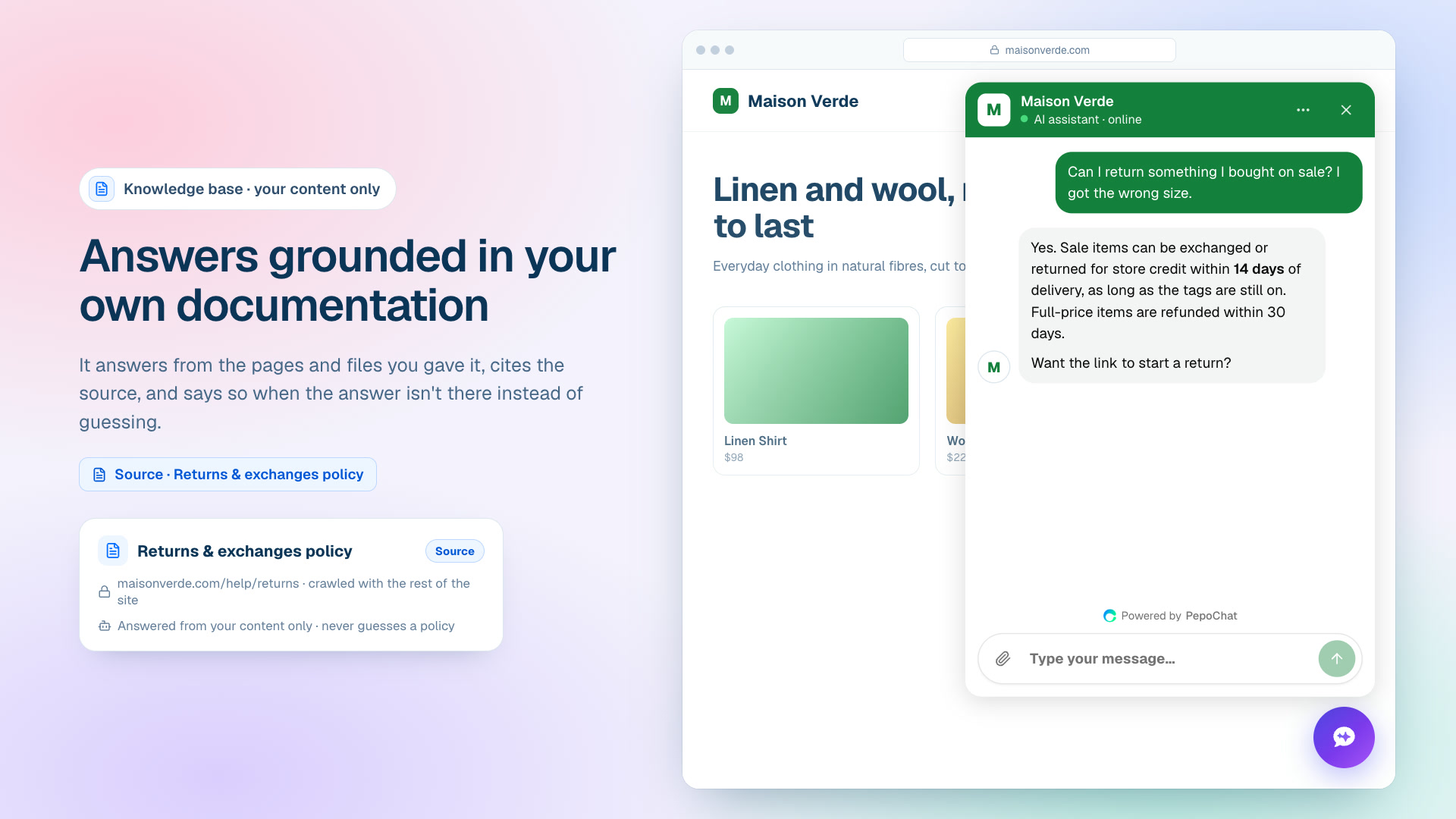
Every reply is retrieved from your content; when the answer is not there, the agent says it does not know and offers a person, who picks the chat up in a shared inbox (details in how answers work). PepoChat's published Vidpal customer story shows this on a live site: in a 14-question check on 6 November 2026, seven of ten factual answers were correct and one partly correct, the two it could not answer ended with an offer of a person, and no answer was made up.
For integration work, it runs 22 prebuilt actions across 13 integrations (Shopify and WooCommerce order lookups, Stripe subscription checks, helpdesk tickets), custom actions against any HTTPS endpoint, a REST API, signed webhooks and signed identity tokens. Installation is one script tag or the WordPress plugin.
2. Chatbase: best for one agent across many channels
Chatbase trains an agent on files, websites, text, Q&A pairs, Notion pages and closed support tickets, then deploys it to the web, messaging apps, email and phone. Files need selectable text and can be up to 20 MB each; pages behind a login can be crawled on higher plans.
- Best for: teams that need WhatsApp, Instagram, Slack, email and voice from one agent, with models from several providers.
- Price: no free plan (7-day trial); Basic $150 a month, or $120 billed yearly, with 4,000 message credits and unlimited members; Business $500 ($400 yearly) with 15,000.
- Watch out for: the cheapest plan is now $150, credits vary by model, and badge removal costs $99 a month.
For gaps, the agent uses a fallback reply you write, and an Escalations action can open a ticket in Chatbase's helpdesk or tools like Zendesk.
3. SiteGPT: best for very large sites
SiteGPT is built around the website, with plan allowances of 1,000, 10,000 or 50,000 pages, where one page is 2,500 cleaned characters. It parses Office files, RTF and Markdown, reads scanned PDFs with OCR, and connects Notion, Google Drive, Dropbox, OneDrive and Box.
- Best for: content-heavy sites, and teams that want the bot inside Slack, Messenger, Crisp or Zendesk Messaging.
- Price: Starter $59 a month or $468 a year with up to 4,000 GPT-4.1 mini messages; Growth $129 ($948 a year); Scale $429 ($3,108 a year); 7-day trial with a card.
- Watch out for: Starter refreshes only when you click; auto refresh is monthly on Growth and weekly on Scale.
Because its crawler ignores robots.txt, exclude private paths in the crawl settings yourself.
4. CustomGPT.ai: best for cited answers over a big document set
CustomGPT.ai crawls your sitemap when it finds one and otherwise follows links up to the per-agent limit. It accepts what its pricing page calls 1,400+ document formats, plus YouTube and podcasts, and connects Notion, Google Drive and Confluence on the entry plan.
- Best for: research-heavy teams that want a source link on every answer and a RAG API.
- Price: no free plan (7-day trial); Standard $99 a month ($89 billed yearly) for 1,000 queries and 10 agents; Premium $499 ($449) for 5,000 queries.
- Watch out for: website auto-sync starts on Premium, and there is no inbox for human replies; gaps get an "I don't know" message you can rewrite.
5. DocsBot AI: best for documentation and developer content
DocsBot handles 28+ source types, including GitHub, Confluence, SharePoint, Google Drive, Notion and resolved helpdesk tickets, and links each answer to its source. Its pricing page describes the pipeline as clean, chunk, retrieve and rerank, and defines a source page as about 5,000 characters.
- Best for: product docs, API references and help centers whose readers expect a citation.
- Price: Free with 50 source pages and 100 AI credits; Personal $49 a month (5,000 pages); Standard $149 (15,000); Business $499 (100,000).
- Watch out for: the bot stops responding when monthly credits run out, and escalation drafts a ticket rather than opening a live inbox.
6. Dante AI: best for clear crawl diagnostics
Dante AI's docs are the most detailed here about crawl failures, from blocked crawlers to thin results on JavaScript-built pages. It reads documents up to 50 MB, extracts text from JPG and PNG images, and syncs Google Drive and Notion.
- Best for: small businesses that want a free start and frequent re-sync without a developer.
- Price: Free (100 messages, 150,000 characters); Starter $40 a month ($33.33 billed yearly) for 2,000 messages; Advanced $120 ($100); Pro $400 ($333.33).
- Watch out for: a person can take over only from Advanced, and indexing stops when the character allowance fills.
7. Wonderchat: best for citations with a free live-chat fallback
Wonderchat crawls your domain, cites the page behind each answer and, when it cannot answer confidently, escalates by email with the conversation attached. Live chat handover and Google Drive are on every plan, Free included.
- Best for: teams that want handover and citations on a small budget, with SOC 2 and HIPAA reports on Enterprise.
- Price: Free with 50 AI replies; Starter $39 a month ($32.50 billed yearly) for 500; Basic $149 ($125) for 3,000; Scale $499 ($417) for 10,000.
- Watch out for: caps of 100 to 2,000 webpages per agent, monthly retraining below Scale, and an agent that stops replying when AI replies run out.
8. My AskAI: best inside Zendesk, Intercom or HubSpot
My AskAI installs from your helpdesk's marketplace and answers inside the widget you already run. Its website sync help page says it looks for up to 2,500 pages per site and re-scrapes every two weeks.
- Best for: support teams already paying for Zendesk, Intercom, Freshdesk, Gorgias or HubSpot.
- Price: no free plan (30-day trial, no card); Pro $199 a month ($130 billed annually) for about 1,000 tickets; Scale $499 ($333).
- Watch out for: three websites on Pro, and human replies that need your helpdesk's own seats.
9. Chatling: best low-cost entry
Chatling's crawler extracts up to 1,000 pages, and its data-source docs send bigger sites through a sitemap. It reads PDF, DOCX and TXT files and imports Notion and Zendesk content.
- Best for: tight budgets, and teams that also want a visual flow builder.
- Price: Free (200 AI credits); Starter $25 a month (1,750 credits, weekly auto-sync); Growth $75 (6,000, daily auto-sync); Scale $295.
- Watch out for: credits per reply depend on the model, and the handoff action ships switched off.
10. FastBots: best for agencies running several bots
FastBots crawls 2,500 pages per bot on its entry plan and up to 10,000 on Reseller, takes Office and CSV files plus Google Sheets and YouTube links, and says its crawler handles JavaScript sites. It can also let a bot draw on the model's general knowledge or live web data, so switch that off if answers must stay inside your content.
- Best for: agencies and resellers managing bots for several clients.
- Price: Essential $39 a month ($33 billed yearly) for 2 bots and 2,000 credits; Business $89 ($75); Premium $199 ($165); Reseller $399 ($333); free trial without a card.
- Watch out for: auto retrain and live chat takeover start on Business, and there is no Notion or Drive connector.
Which one should you pick?
Start from the content you have and the failure you can least afford:
- If you need answers, order lookups, booking and a human fallback on a small budget, start on PepoChat's free plan.
- If your site runs to many thousands of pages, SiteGPT's Growth plan (10,000 pages) or FastBots fits better than a 200-page crawl.
- If every answer must show its source, shortlist CustomGPT.ai and DocsBot.
- If your support team works in Zendesk or Intercom, My AskAI keeps conversations there.
- If you need Instagram, email or SMS from one agent, Chatbase covers more channels.
- If content changes daily, pay for daily refresh (Chatling Growth, Dante AI Pro) or keep fast-moving facts in a synced Notion or Drive source.
Per-user data behind private APIs or strict data residency calls for a custom build, which our AI and machine learning team and custom software developers can scope. Choosing between a builder and a ready agent? See the best no-code AI chatbot builders; how to add a ChatGPT chatbot to your website covers the do-it-yourself routes.
Make your site easy to retrieve from: a 10-point checklist
These fixes raise answer quality in any tool, and most fit in a short ticket for your web development team.

- Publish a clean XML sitemap that follows the sitemaps.org protocol, and give the tool the sitemap rather than the homepage.
- Read your robots.txt alongside Google's robots.txt guide: allow what the bot needs, block what it should never quote.
- Check key text is in the HTML. View the source of your pricing, shipping and returns pages; if the numbers are missing, render them on the server.
- Write each fact once. Delete or redirect outdated policy pages and old PDFs.
- Replace scanned PDFs with text PDFs or HTML, and move text out of images into the page copy.
- Use descriptive headings. "Refunds on sale items" becomes a clean, findable chunk.
- Spell out numbers: prices with currency, hours with time zones, limits with what they apply to.
- Add a Q&A source for the 20 questions your team answers most, phrased the way customers ask.
- Match refresh to your change rate, and re-sync by hand after any pricing or policy change.
- Review unanswered questions monthly and add the missing content instead of patching instructions.
What to do next
Take your 20 most common customer questions, run them against two tools from this list on free plans or trials, and mark each answer right, partly right, declined or invented. Create a free PepoChat workspace as one of the two. If you run a SaaS product, our roundup of the best AI chatbot for SaaS customer support adds billing and account questions to that test.
Frequently asked questions
Does an AI chatbot trained on your website actually learn your data?
Not in the sense of retraining a model. Website chatbots use retrieval-augmented generation: your pages are split into passages in a searchable index, and the most relevant passages are handed to the language model each time a visitor asks. Change a page and re-sync, and the next answer reflects it.
Is PepoChat free?
Yes. The Free plan needs no card and has no trial clock: you get 100 AI replies each month, one seat and up to five knowledge sources, and a whole-site crawl counts as one of them. Actions, booking and human handoff all work on it. Starter, at $39 a month, raises the allowance to 1,000 replies, with extra replies at $39 per 1,000, as of November 2026.
How often does a website chatbot re-read my pages?
It depends on the tool and plan. As of November 2026, PepoChat re-syncs URL sources weekly on every plan, Chatbase weekly from its Basic plan, Chatling weekly on Starter and daily on Growth, and SiteGPT only manually on Starter. After a price or policy change, trigger a manual re-sync instead of waiting for the schedule.
Can a website chatbot read scanned PDFs?
Only some can. A scanned PDF is an image with no text layer, so tools that extract text directly see nothing. Chatbase requires selectable text, while SiteGPT and Dante AI run optical character recognition on scans and images. The safest fix is to publish the same content as a text PDF or a normal web page before adding it.
Is Chatbase better than PepoChat?
Chatbase is better if you need one agent across Instagram, email, Slack and phone, a choice of AI models, or published SOC 2 and HIPAA claims. PepoChat is the better value for most small teams: a free plan, weekly re-sync on every plan, actions and a shared inbox included, and Starter at $39 against Chatbase's $150 Basic plan.
Should I build my own RAG chatbot instead of buying one?
Build when your data sits behind private APIs, needs per-user permissions, or must stay in a specific region. Buy when the content is public pages, documents and help articles, because hosted tools already handle crawling, parsing, re-sync, the widget and handoff. Many teams start hosted and build later.