
Short answer: Vidpal is the better pick for short-form social video as of November 2026. One credit turns a prompt, script or URL into a captioned 9:16 Short (about $0.98 on Pro), and the same plan clips long videos, edits your footage and schedules posts to Instagram, TikTok, YouTube and LinkedIn. Choose Pictory for long narrated explainers up to 30 minutes, and InVideo AI for generative-video scenes, AI avatars or timeline editing.
- Only Vidpal publishes and schedules; InVideo AI and Pictory are download-only.
- Pictory Starter costs $29 a month for up to 30 minutes of video.
- InVideo AI bills by model: about 96 credits per 5 seconds of Seedance 2.5 video at 1080p.
- Vidpal has no AI avatars or voice cloning; both rivals do.
This AI video maker comparison is for teams that treat video as part of a production pipeline: a product team cutting launch clips for a new mobile app release, a marketer turning blog posts into Shorts, an agency feeding several client accounts. Vidpal, InVideo AI and Pictory all start from text. They split on what comes out, how much work sits between draft and post, and whether the tool posts for you.
Every claim about a tool comes from that company's own pages, checked on 6 November 2026, and we compared them on inputs, visuals, voices and captions, editing, avatars, output formats and length, publishing, AI assistant integrations, pricing and free plans. Prices are in US dollars as of November 2026, and where a vendor does not publish a number, we say so.
Vidpal vs InVideo AI vs Pictory at a glance
Vidpal is built for short vertical video from idea to post, InVideo AI is an agent-driven editor with access to generative models, and Pictory is a text-to-video tool that suits longer narrated videos.
| Criteria | Vidpal | InVideo AI | Pictory |
|---|---|---|---|
| Best for | Short-form social: faceless Shorts, Reels, clips, autopilot posting | Generative scenes and timeline editing driven by an AI agent | Long narrated explainers and training videos from text |
| Inputs | Topic, full script, web page URL, your own footage, long recordings | Prompt, script, your footage and images, article text, product URL and screenshots | Prompt, script, URL or blog post, Word/PDF, PPT, audio, recordings |
| Visuals | Pexels and Pixabay stock, AI images in 20 styles, gameplay loops, 5-second AI hook clip | Stock (iStock premium allowance), AI images, generative video (Seedance, Veo 3.1, Kling) | Getty and Storyblocks stock, AI images and video models (Veo 3.1, Pixverse and others) |
| Voices | AI system voices by language; no cloning | ElevenLabs, Minimax and others; voice cloning in AI twins | 170+ ElevenLabs voices in 29+ languages; cloning on Professional and up |
| Captions | 75 presets, Brand Kit, translate and dub (8 languages) | Editable captions, SRT download | Auto captions, SRT, VTT and TXT export |
| AI avatars | None | Avatar clone, human and virtual actors | Stock avatars; 2 custom avatars on Professional |
| Output | 9:16 Shorts of 30-90 s; 16:9 videos of 1-10 min (paid); 1080p | 1080p MP4 export (4K via paid upscale); 16:9 or 9:16 | 16:9, 9:16, 1:1; up to 30 minutes; max 1080p |
| Publishing | Publish or schedule to Instagram, TikTok, YouTube, LinkedIn (Pro, Business) | Download only | Share link or MP4 download |
| Free plan | 4 lifetime credits, watermark; Studio exports need a paid plan | None on the pricing page | None; 14-day trial at 720p with Pictory branding |
| Paid from | $19/month ($12 billed yearly) | $20/month ($10 billed yearly) | $29/month ($25 billed yearly) |
Vendor-published prices and features, accurate as of 6 November 2026.
What each tool is in November 2026
InVideo AI has changed shape, so older reviews of it mislead. It now sells itself as "the agentic video editor": an agent called Agent Two works on a multitrack timeline and calls third-party models such as Seedance, Veo 3.1, Kling and Nano Banana Pro, and outside agents can drive it through an MCP server or a CLI. Its classic prompt-to-video flow, with AI twins and avatars, now sits under "Older versions". Pictory now advertises "Agentic video workflows" in Pictory 3, but its core is still text in, narrated stock-footage video out.
Vidpal is an AI content engine for short-form video. Studio makes faceless videos from a topic, script or URL; Auto Reels finds stories in your niche and renders Reels on a schedule; AI Editing and AI Clips work on footage you recorded; and the Social Scheduler posts the results. A faceless video is one where no presenter appears on camera: narration plays over stock clips, images or background loops.
Inputs: prompt, script, URL and long video
All three accept a prompt, a script and an article, but only Vidpal and Pictory fetch a web page themselves, and Vidpal also cuts long recordings into scored short clips.
Vidpal's Studio takes a topic, a full script or a URL and writes a script you can review and edit before rendering. AI Clips cuts a long upload (up to 2 hours on paid plans) into scored clips; our OpusClip vs Vidpal vs Vizard comparison covers that side in depth. AI Editing takes your own MP4 or MOV files.
Pictory takes the widest range of document inputs: an idea, a script, any public URL or blog post (it pulls the key points into a script with a hook and a call to action), Word and PDF files, PowerPoint decks, audio and screen or camera recordings. Pictory's URL-to-video page describes the article flow. Its editor accepts long uploads of up to 60 minutes on Starter and 180 minutes on Professional and Teams.
InVideo AI takes prompts, scripts, your own footage and images, Google Drive files, and product URLs with screenshots. For articles, invideo's article-to-video guide states that "invideo does not fetch web pages": the agent reads the URL with its own browser, or you paste the text.
Visuals: stock footage, AI images and generative video
InVideo AI is built around generated motion, Pictory around a large licensed stock library, and Vidpal keeps visuals cheap and predictable at one credit per Short. Generative video means footage created by a text-to-video model from a prompt, rather than stock clips or still images with motion added.
InVideo AI gives its agent access to Seedance 2.5 and 2.0, Veo 3.1, Kling and Nano Banana Pro, plus a premium stock allowance of 100 to 500 items depending on plan. Generated motion is where the credits go: invideo's credit docs put Seedance 2.5 at about 56 credits per 5 seconds at 720p and 96 at 1080p, while a Nano Banana Pro image costs about 2.5. If a video uses more iStock than your plan includes, you pay the difference at download.
Pictory draws on Getty and Storyblocks stock (5 million+ videos on Starter, 18 million+ on Professional) and lists AI image and video models, including Veo 3.1, Veo 3.1 Fast, Pixverse, Flux Schnell and Nano Banana.
Vidpal's Studio offers four video sources: real Pexels and Pixabay stock clips matched to each script section, AI-generated images in 20 styles from natural and cinematic to anime, stickman and claymation, or a looping gameplay or oddly satisfying clip behind the narration. The AI images are stills with camera motion, not generated video. The one generated-motion option is an optional hook intro: a roughly 5-second AI clip made from text or an image, for 1 extra credit. Vidpal is not the tool for cinematic text-to-video footage; for that, InVideo AI's model hub or a dedicated generator such as Veo, Kling or Runway is the better route.
Voices and captions
Pictory publishes the broadest voice catalog, InVideo AI and Pictory both clone voices, and Vidpal has the most caption styling. Pictory offers 170+ ElevenLabs voices in 29+ languages (29 on Professional and Teams, 7 on Starter), voice cloning on Professional and above with a consent recording, and captions exported as SRT, VTT or TXT. InVideo AI uses ElevenLabs, Minimax and other voice models, clones voices for AI twins with a recorded consent statement, and supports editable captions with SRT download.
Vidpal narrates with AI system voices grouped by language and does not clone voices; its voice-cloning feature was retired. Studio's auto captions are generated in English, so for other languages you use the editor's Translate panel, which translates captions and dubs the voice into 8 languages. Where Vidpal leads is styling: 75 caption presets with animations, plus a Brand Kit that applies your logo, colors, caption style and font to every video. Our guide to AI video generators with voiceovers and captions compares more voice and caption tools.
Editing and AI avatars
InVideo AI has the most capable editor for generated content, Vidpal has the most automatic editing for your own footage, and Pictory sits between them. An AI avatar is a synthetic presenter, either stock or cloned from a real person, that speaks your script on camera.
Editing
InVideo AI's editor is a real multitrack timeline, and edits, exports and downloads cost no credits. Through its ChatGPT plugin it can also hand over a Premiere Pro, Final Cut or DaVinci project. Pictory offers an AI video editor for long recordings, brand kits (1 on Starter, 5 on Professional, 10 on Teams) and an automatic video summary on Professional.
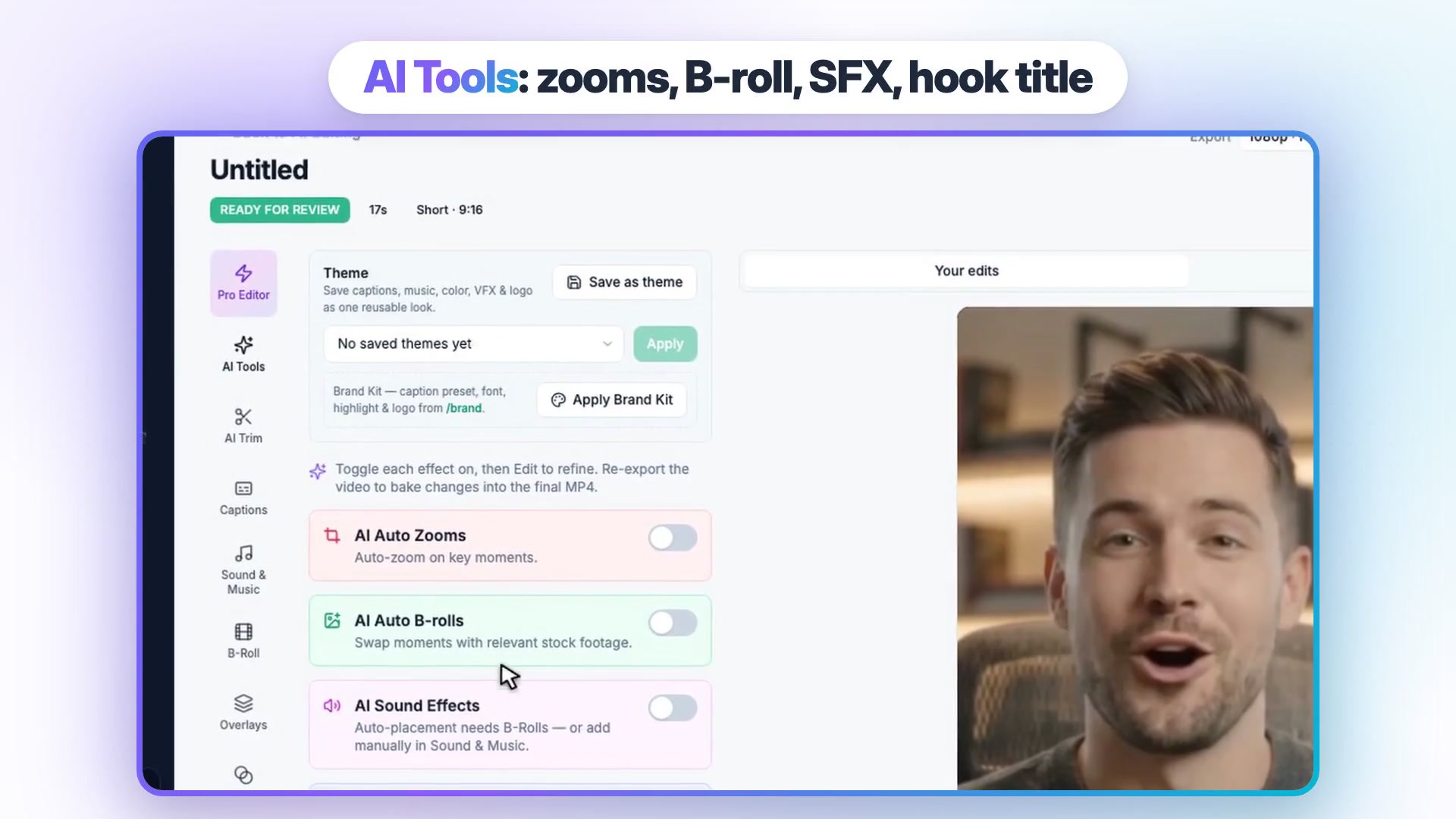
Vidpal's AI Editing works on footage you upload: AI Trim removes silences and filler words, and toggles add AI auto zooms, AI b-roll from stock, AI sound effects and a hook title. Smart Reframe turns 16:9 into 9:16. The Pro Editor adds a timeline, 45+ animated overlay templates, 1,000+ music tracks plus your uploads, and transitions. It is not a frame-by-frame editor for long-form films. Vidpal's AI b-roll generator page shows how the auto b-roll step works.
AI avatars
If your video needs a face, Vidpal is out: it has no talking avatars. InVideo AI offers three avatar types: a clone of yourself, human actors and virtual actors, with Pro actors needing an active plan. Pictory includes stock avatars on Starter (15 AI credits per 30 seconds) and 2 custom avatars on Professional. For avatar-led training at scale, dedicated tools such as Synthesia or HeyGen are worth a separate look.
Output formats, length and publishing
Pictory makes the longest videos, InVideo AI can upscale to 4K, and Vidpal is the only one that posts what it makes. With auto-publishing, you connect your social accounts once and the tool uploads each finished video for you, immediately or at a time you set.
Pictory exports 16:9, 9:16 and 1:1 at up to 1080p, and script or URL videos can run up to 30 minutes. Publishing is a share link or an MP4 download, and its YouTube help article describes downloading the file and uploading it yourself.
InVideo AI's export renders a 1080p MP4, with 4K available through a paid upscale model. Its article flow offers 16:9 or 9:16 at 30, 60 or 90 seconds. Its docs are explicit: "The agent never publishes the video. You post it," and they point users to schedulers such as Buffer or Later.
Vidpal's Studio makes 9:16 Shorts of 30, 45, 60, 75 or 90 seconds and, on paid plans, 16:9 videos of 1 to 10 minutes, exported at 1080p. On Pro and Business you connect Instagram, TikTok, YouTube and LinkedIn once, then publish a video now or schedule it up to 90 days ahead, at no credit cost. Auto Reels goes further: it finds stories for your topics, writes and renders a Reel twice a day on Pro or three times on Business, and can post it; see Vidpal's AI Reels generator. Vidpal does not post to Pinterest, X or Facebook, and Starter users share manually.
Working with ChatGPT, Claude and APIs
InVideo AI has the deepest assistant integration, Pictory the most traditional API, and Vidpal a no-key MCP connector. MCP (Model Context Protocol) is an open standard for plugging outside apps into AI assistants; an MCP connector is one app's entry point, so Claude or ChatGPT can run that app's actions for you.
InVideo AI is listed in ChatGPT's plugin directory as "invideo" and runs an MCP server and CLI for Claude, Codex and Cursor. Pictory offers a custom GPT, "Pictory GPT for Videos", but OpenAI is retiring custom GPTs on 11 December 2026; it also sells a separate API and connects to Zapier and Make.
Vidpal works as an MCP connector. In Claude you add its server URL and sign in, with no API key, then ask Claude to edit, clip, export or schedule; Claude asks before spending credits or posting. In ChatGPT it is added as a custom MCP connector, which OpenAI's help center limits to Business and Enterprise/Edu plans on the web, with read and fetch only on Pro. A simpler route works on any plan: write the script in ChatGPT and paste it into Studio's Full Script input. Our roundup of AI video tools that work with ChatGPT covers every option, and teams wiring video into their own product can start with our AI and machine learning services.
Pricing and cost per video
Vidpal has the simplest cost per Short, Pictory the lowest cost per minute of stock-footage video, and InVideo AI the most variable bill.
| Tool and plan | Monthly | Billed yearly | What you get |
|---|---|---|---|
| Vidpal Free | $0 | n/a | 4 lifetime credits, watermark; Auto Reels and carousels render, Studio exports need a paid plan |
| Vidpal Starter | $19 | $12/month | 15 credits/month, 1080p, no watermark, manual share |
| Vidpal Pro | $39 | $23/month | 40 credits/month, scheduling, twice-daily Auto Reels |
| Vidpal Business | $69 | $41/month | 100 credits/month, 3x daily Auto Reels, 4K for AI Clips and AI Editing |
| InVideo AI Starter | $20 | $10/month | 400 credits, 100 premium stock, agents "Lite only" |
| InVideo AI Plus | $60 | $30/month | 2,000 credits, 200 premium stock, all models |
| InVideo AI Max | $250 | $250/month | 8,000 credits, 500 premium stock |
| Pictory Starter | $29 | $25/month | 2,000 credits (up to 30 min/month), 1080p, 1 brand kit, stock avatars |
| Pictory Professional | $59 | $35/month | 6,000 credits (up to 90 min/month), voice clones, 2 custom avatars |
| Pictory Teams | $199 | $119/month | 18,000 credits (up to 300 min/month), 3+ users |
Vendor-published prices and features, accurate as of 6 November 2026. InVideo AI prices are per seat; Team, Scale and Enterprise tiers are also offered.
Vidpal's math is fixed: 1 credit per short video and 5 per long 16:9 video, so a Short costs about $1.27 on Starter, $0.98 on Pro and $0.69 on Business with monthly billing. Pictory's plan table equates 2,000 credits with 30 minutes of video, about $0.97 per minute on Starter, but avatars and other AI features draw on the same pool. InVideo AI does not publish a per-video price; the bill depends on which models the agent calls, and credits do not roll over. Full plans are on Vidpal's pricing page, InVideo AI's pricing page and Pictory's pricing page.
Worked example: a month of Shorts plus explainers
Take a realistic month for a small product team: 30 one-minute Shorts for social, plus four 5-minute 16:9 explainers for the website. Here is what each tool's published numbers imply.
| Monthly workload | Vidpal | Pictory | InVideo AI |
|---|---|---|---|
| 30 one-minute Shorts | 30 credits: Pro, $39 ($1.30 per Short), 10 credits spare | 30 minutes: Starter, $29 ($0.97 per Short) | Not published per video; depends on models used |
| 4 five-minute explainers | 20 credits: Pro, $39, 20 credits spare for Shorts | 20 minutes: Starter, $29 ($7.25 per explainer) | Not published per video |
| Both together | 50 credits: Business, $69 ($41 yearly), 50 credits spare | 50 minutes: Professional, $59 ($35 yearly) | Fully generated footage at 1080p: about 96 credits per 5 seconds |
| Posting included | Yes, scheduled to 4 platforms | No, download and upload | No, download and upload |
Vendor-published prices and features, accurate as of 6 November 2026. Vidpal Starter (15 credits) and Pictory's trial cannot cover these workloads.
On video minutes alone, Pictory is cheaper. Vidpal's case is the work around the video: its price includes scheduling to four platforms, so nobody downloads and re-uploads 34 files, and on Business the 50 spare credits become 50 more Shorts, Auto Reels or carousels. Generative footage is a budget line of its own on InVideo AI: Plus's 2,000 credits buy about 100 seconds of Seedance 2.5 video at 1080p.
AI video maker comparison by scenario
Here is the pick for four common situations.
Faceless Shorts creator: Vidpal
Vidpal wins clearly. One credit makes a 30-90 second Short with voice, captions and stock, AI images or a gameplay loop behind it, and Auto Reels keeps the queue full while auto-publish posts on schedule. Neither rival posts for you. Vidpal's own case study of 38 AI-generated Shorts is a reality check: posted on seven test channels from 16 September to 5 October 2026, they drew 13,538 views (median 36.5 per Short), 81% of them on one 15-subscriber channel. Faceless Shorts can find viewers, but results are uneven.
Blogger turning articles into videos: Vidpal for Shorts, Pictory for long versions
Paste a post's URL into Vidpal's Studio and you get a 30-90 second social cut with a reviewable script, ready to schedule. If you want the whole article as a 5- to 10-minute narrated video for YouTube or your site, Pictory's URL input, 30-minute ceiling and per-minute pricing fit better. InVideo AI works too, but its agent fetches the page, not invideo itself. If the site itself needs rebuilding around video, see our web development service.
Marketer making long explainers: Pictory or InVideo AI
For 5- to 30-minute explainers, product walkthroughs and training modules, Pictory is the better tool: PPT and document inputs, 29+ voice languages, voice clones, brand kits and, on Enterprise, SCORM export. InVideo AI is the pick when the explainer needs generated scenes or fine timeline control. Vidpal's long videos top out at 10 minutes and cost 5 credits each, which suits a short 16:9 version of a launch story rather than a course. Vidpal's guide on making explainer videos with AI covers the short end of that range.
Team needing avatars: InVideo AI or Pictory
Vidpal has no talking avatars, so it is the wrong tool here. InVideo AI offers avatar clones and actors; Pictory offers stock avatars from Starter and custom avatars from Professional. Teams producing presenter-led training in many languages should also price dedicated avatar platforms such as Synthesia and HeyGen.

Verdict: which is better?
For short-form social video, Vidpal is better overall. It is the only one of the three that covers idea, script, voice, visuals, captions, clipping, editing and publishing in one place, at a price per finished Short you can compute in your head. Vidpal's own InVideo alternative page lays out its side of that comparison. Pick Pictory if your main output is long narrated explainers or training videos from documents, and InVideo AI if you need generated motion, avatars or a full timeline driven by an agent.
What to do next
List your monthly mix of Shorts, long videos and avatar videos and price it with the tables above. If Shorts dominate, start a Vidpal account and run one script through Studio before you commit to a plan. If video needs to live inside your own app or site, book a free consultation with our team.
Frequently asked questions
Is Vidpal better than InVideo AI?
For short-form social video, yes. As of November 2026 Vidpal makes a captioned 9:16 Short from a prompt, script or URL for one credit and can publish or schedule it to Instagram, TikTok, YouTube and LinkedIn. InVideo AI is better for generative-video scenes, AI avatars and timeline editing, but it is download-only and prices by model credits.
Is Pictory good for YouTube Shorts?
Pictory can export 9:16 video from a script or URL, so it can make Shorts, but it is stronger for longer 16:9 explainers of up to 30 minutes. It has no direct publishing, so you download each file and upload it to YouTube yourself. Vidpal is built around 30-90 second Shorts and schedules them.
Which AI video maker has a free plan?
Vidpal has a free plan with 4 one-time credits and a watermark; Auto Reels and carousels render on it, while Studio exports need a paid plan. Pictory has no free plan, only a 14-day trial at 720p with Pictory branding. InVideo AI's pricing page showed no free plan on 6 November 2026.
Can InVideo AI or Pictory post to social media automatically?
No. InVideo AI's docs say its agent never publishes a video and suggest schedulers such as Buffer or Later. Pictory offers a share link or an MP4 download, and its help center describes uploading to YouTube by hand. Vidpal's Pro and Business plans publish or schedule to Instagram, TikTok, YouTube and LinkedIn up to 90 days ahead.
Which tool is best for AI avatar videos?
Of these three, InVideo AI and Pictory both offer AI avatars: InVideo AI has self-clones plus human and virtual actors, and Pictory has stock avatars from Starter and custom avatars from Professional. Vidpal does not offer talking avatars. Teams making avatar-led training at scale should also compare dedicated tools such as Synthesia and HeyGen.
How much does one AI video cost on each tool?
On Vidpal a short video costs one credit, about $0.98 on Pro or $0.69 on Business with monthly billing, and a long 16:9 video costs 5 credits. Pictory Starter works out to about $0.97 per minute of video. InVideo AI publishes credit costs per model, not per video, so the price depends on what the agent generates.