
Short answer: ChatGPT cannot generate videos by itself as of 6 November 2026: OpenAI closed the Sora app on April 26 and the Sora API on September 24, 2026. The best ChatGPT video generator setup is Vidpal: write the script in ChatGPT and paste it into Vidpal Studio, or connect Vidpal as an MCP connector in Claude or ChatGPT Business. Pick HeyGen for avatars, or InVideo AI if you want an official ChatGPT plugin.
- InVideo, HeyGen, Descript, Adobe, VEED and Canva have ChatGPT plugins; none says it posts to social platforms.
- Full custom MCP connectors need ChatGPT Business or Enterprise/Edu.
- Custom GPTs retire on 11 December 2026.
- Vidpal costs about $0.98 per short video on Pro.
Search for a ChatGPT video generator and you will find two kinds of pages: old ones that say ChatGPT makes videos with Sora, and vendor pages that say their product now "works with ChatGPT" without saying how. For a product team that needs a steady flow of demo clips and launch Shorts, the difference matters: a plugin that drafts a video in a chat is not a connector that edits and schedules your real videos.
Each product was compared using its own pricing page and documentation as of 6 November 2026, focusing on how it actually connects to ChatGPT (plugin, MCP connector, API or Zapier), what it produces, voice and captions, publishing, and price. Prices are in US dollars, checked the same day.
Vidpal ranks first: it covers script, voice, visuals, captions, clipping, editing and publishing for short-form video in one place, connects through an MCP connector, and accepts a ChatGPT-written script as is. The rest are ranked by how well they really connect.
Can ChatGPT make videos by itself?
No, not as of 6 November 2026. OpenAI's help article on the Sora discontinuation says the Sora web and app experiences closed on April 26, 2026, and the Sora API on September 24, 2026. ChatGPT's pricing page lists image generation on its plans but no video generation. Any guide that tells you to "make a video in ChatGPT with Sora" predates those dates.
ChatGPT is good at the writing around a video: script, hook, captions, titles. When a video appears in a ChatGPT chat today, a third-party service rendered it on its own plan. Runway's MCP page says it plainly: ChatGPT can't make video on its own. So the question is which tool you connect, and how deeply.
Three ways a video tool can work with ChatGPT
Every "works with ChatGPT" claim fits one of three patterns, each with different plan rules.
- A plugin from ChatGPT's directory. OpenAI now calls its app directory "Plugins" (very old mobile app versions still say Apps). You install one, connect your vendor account, and choose how much it may do without asking, from "always ask" to "all actions". The directory is open on every plan, but installing a given plugin depends on plan, workspace, role and region. InVideo, HeyGen, Descript, Adobe, VEED and Canva are listed.
- A custom MCP connector. You add a vendor's server URL yourself ("Add custom MCP server"). OpenAI's guide to connecting custom MCP servers gives full support to Business and Enterprise/Edu on the web, read and fetch only to Pro, and in Business only admins or owners can add one. Free, Go and Plus are not listed. Vidpal and Zapier work this way.
- Copy and paste. ChatGPT writes the script and you paste it into the video tool, on any plan, Free included. This is how most people use Vidpal Studio's "Full Script" input.
And the GPT Store? OpenAI's custom GPT retirement FAQ says custom GPTs retire on 11 December 2026 and their custom actions do not carry over. InVideo's and Pictory's video GPTs still load, but do not build on them.
How MCP connectors work, in plain words
An MCP connector is a small server, run by the video company, that tells an AI assistant which actions it may take in that product and performs them for your account. MCP stands for Model Context Protocol, an open standard that lets assistants such as Claude and ChatGPT use outside apps. Think of it as an API documented for the model instead of a developer. Four pieces make it work:
- A server URL. You paste one address into the assistant's settings. Vidpal's address for Claude is https://app.vidpal.ai/api/mcp/editor; HeyGen publishes https://mcp.heygen.com/mcp/v1/ and Synthesia https://mcp.synthesia.io/mcp.
- OAuth sign-in. The assistant sends you to the vendor's login page, you approve access, and it receives a scoped token. Vidpal needs no API key, so there is no secret to paste into a chat.
- A list of tools. Named actions with typed inputs. For Vidpal: upload, cut silences, add captions, b-roll or zooms, cut clips, export, publish or schedule. The assistant picks one and fills in the arguments.
- Approvals. Claude asks before any Vidpal action that spends credits or publishes.
Why do approvals matter? A model can read "make it shorter" as "cut it to 15 seconds and post it", and a spent render or a public post cannot be undone. A good MCP server separates read tools (list videos) from write tools (render, publish), enforces credits on the server rather than trusting the model, and pauses for a human yes. Designing your own connector? That pattern belongs in the spec, and our custom software development team settles it with clients before writing code.
ChatGPT video generator options compared
| Tool | ChatGPT route (November 2026) | Other assistants | What it makes | Posts to social platforms | Price from (monthly billing) |
|---|---|---|---|---|---|
| Vidpal | Custom MCP connector (not in the plugin directory); paste scripts into Studio | Claude connector | Captioned Shorts, Reels and TikToks, long 16:9 videos, clips, edits of your footage | Instagram, TikTok, YouTube, LinkedIn (Pro and Business) | Free (4 credits); $19/month |
| InVideo AI | Official "invideo" plugin; legacy GPT | MCP server and CLI (Claude, Codex, Cursor) | AI-built cuts on an editable timeline, 1080p MP4 | No, download only | $20/month |
| HeyGen | Official plugin | Remote MCP on all plans; API | Avatar videos, voice clones, translations | None found | Free; $29/month |
| Descript | Official plugin | MCP connector; API; Zapier | Edited recordings, clips, captions | YouTube, Wistia, HubSpot, podcast hosts; not TikTok or Instagram | Free; $24/month |
| Adobe | Official "Adobe" plugin (70+ tools) | Codex | Reformatted clips, highlight reels, designs | Express Content Scheduler (TikTok, Instagram, Facebook, X, Pinterest, LinkedIn) | Express Premium $9.99/month |
| VEED | "VEED Video Generator" plugin | API | AI character videos; full browser editor | No, download only | Free; $25/month |
| Canva | Canva plugin (listing describes designs, not video) | Claude, Gemini, Copilot via its AI Connector | Template videos, short AI clips | Direct sharing; scheduling on Pro | Free; $18/month |
| CapCut | Not in the US directory; desktop plugin outside the US | None found | Template edits, captions | TikTok sharing | Free; $19.99/month |
| Zapier | Custom MCP server | Claude, Cursor | Nothing; it moves files between apps | YouTube, Instagram Business Reels; no TikTok | Free; $29.99/month |
Official pricing and feature pages, read on 6 November 2026.
The best AI video tools that work with ChatGPT, ranked
1. Vidpal: best overall, with an MCP connector and a paste-in script path
Vidpal is an AI content engine for short-form video. It turns a topic, script, web page or long recording into captioned vertical videos, runs an autopilot that renders Reels from real stories in your niche, and schedules to Instagram, TikTok, YouTube and LinkedIn. It offers two doors for ChatGPT users.
- Best for: teams who draft in ChatGPT or Claude and want finished, captioned, scheduled Shorts without stitching four tools together.
- Price: Free (4 one-time credits, watermark); Starter $19/month ($12/month billed yearly, 15 credits); Pro $39/month ($23/month yearly, 40 credits); Business $69/month ($41/month yearly, 100 credits). One credit makes one short video.
- Watch out for: Vidpal is not in ChatGPT's plugin directory as of 6 November 2026, so the ChatGPT connector route depends on a Business or Enterprise workspace. No talking avatars, no voice cloning, and it is not a cinematic text-to-video model.
The first door is the connector. Vidpal's pricing page says it "works inside Claude & ChatGPT (MCP connector)". In Claude you add the server URL above, sign in and approve; the Claude connector docs walk through it. Then you ask it to edit, clip, export or schedule, and it checks with you before spending credits or publishing. In ChatGPT, Vidpal is a custom MCP connector, which under OpenAI's rules means a Business or Enterprise/Edu workspace; Vidpal's ChatGPT setup guide covers its side. Exports through the connector need a paid Vidpal plan, and publishing needs Pro or Business.
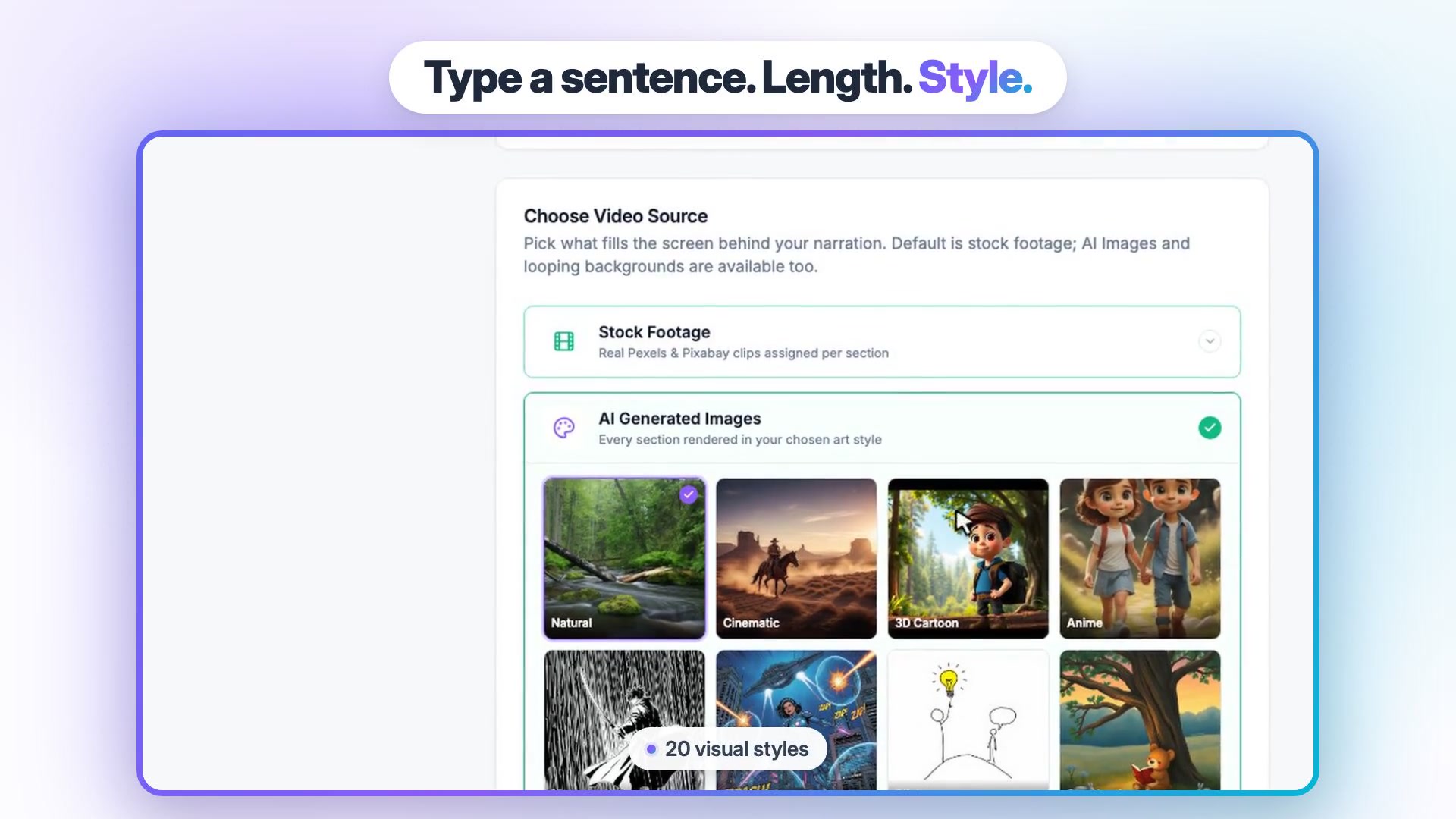
The second door works on every ChatGPT plan, Free included: write the script in ChatGPT and paste it into Studio's "Full Script" input. Studio makes a Short of 30, 45, 60, 75 or 90 seconds in 9:16, or a 1 to 10 minute 16:9 video on paid plans. You choose what fills the screen (Pexels and Pixabay stock clips, AI images in 20 visual styles, or a gameplay or oddly satisfying loop), pick a narrator from system voices grouped by language, and review the script before rendering.
After the render, everything stays in one app: 75 caption presets with word-level timing, a Brand Kit, AI Clips for cutting webinars into scored Shorts, and a Publish panel that schedules up to 90 days ahead at no credit cost. On Pro a short video costs about $0.98. Vidpal's team reported its own test of 38 AI-generated Shorts on seven test channels: 13,538 views in total, a median of 36.5 per Short, with one small channel producing 81% of them. Faceless Shorts can find an audience, but results are lumpy.
2. InVideo AI: best official ChatGPT plugin for AI-assembled drafts
InVideo has the deepest ChatGPT integration of the script-to-video tools. Its official invideo plugin builds the cut on an editable InVideo timeline on your own plan, with export as a rendered video or a Premiere Pro, Final Cut or DaVinci project. An MCP server and CLI cover Claude, Codex and Cursor.
- Best for: teams that want to start a video in ChatGPT and finish it on a real timeline.
- Price: Starter $20/month ($10/month billed yearly, 400 credits); Plus $60/month ($30/month yearly, 2,000 credits); Max $250/month (8,000 credits).
- Watch out for: download only (InVideo's docs say it does not post or schedule), credits do not roll over, and InVideo may change credit costs without notice.
Skip the old "Video AI by invideo" GPT, which retires on 11 December 2026. Our Vidpal vs InVideo AI vs Pictory comparison goes deeper on output.
3. HeyGen: best for avatar videos from ChatGPT or any MCP client
HeyGen is the pick when the video needs a talking presenter. Its ChatGPT plugin covers avatar videos, voice clones and translation into 175+ languages, and its remote MCP server works with Claude, ChatGPT, Codex, Cursor and Gemini CLI, with OAuth sign-in, on every plan.
- Best for: marketing, sales and education teams that need avatar videos or translated versions, triggered from an assistant.
- Price: Free (3 watermarked videos a month, up to 1 minute); Creator $29/month ($24/month billed yearly); Pro $49/month ($41/month yearly, 4K); Business $149/month ($119/month yearly).
- Watch out for: MCP calls spend plan credits, credit cost varies by model and length, and we found no social publishing.
Developers also get a separate API, and Business adds n8n, Make, HubSpot and Zapier.
4. Descript: best for editing recordings by chat
Descript edits audio and video by editing the transcript. Its ChatGPT plugin ("Edit video by chatting") imports media, applies its Underlord AI edits, adds captions and exports a link or a Premiere or Resolve timeline, and its MCP connector works in Claude or any MCP client.
- Best for: podcast and webinar teams that want an assistant to do the first pass of edits and clips.
- Price: Free (60 media minutes a month, 720p); Hobbyist $24 per person a month ($16 yearly); Creator $35 ($24 yearly); Business $65 ($50 yearly).
- Watch out for: it publishes to YouTube, Wistia, HubSpot and podcast hosts but not TikTok or Instagram, and media hours and AI credits cap usage.
Choose Descript for long-form podcast editing; choose Vidpal for vertical Shorts with styled captions scheduled to Instagram and TikTok.
5. Adobe: best for teams already paying for Creative Cloud or Express
Adobe's ChatGPT plugin, announced on the Adobe blog on 6 August 2026, bundles 70+ tools from Express, Photoshop, Firefly, Premiere and Acrobat. It can reformat a clip for YouTube Shorts or Instagram Reels and turn long videos into highlight reels, and guests can try it before signing in.
- Best for: design and marketing teams that already live in Adobe apps.
- Price: Express Premium $9.99/month; Premiere $22.99/month on an annual plan billed monthly (first-year rate).
- Watch out for: generative features spend credits, and the plugin listing does not mention posting; scheduling happens in Express's Content Scheduler.
6. VEED: best ChatGPT plugin for quick AI character videos
VEED's "VEED Video Generator" plugin lets you pick a character and a voice and generate a video from ChatGPT. The full product is a browser editor with subtitles, translation, dubbing and an API.
- Best for: quick talking-character clips, finished in VEED's editor.
- Price: Free (watermark, 720p); Creator $25/month per editor ($12.25/month billed yearly); Pro $45/month ($22.08/month yearly).
- Watch out for: download only; VEED's help center says you upload exports to other platforms yourself.
7. Canva: best free option for template videos alongside other designs
Canva's ChatGPT plugin runs through its AI Connector, which Canva says works on all accounts including Free, and in Claude, Gemini and Copilot. The listing describes designs rather than video, so you finish videos in Canva's editor (auto captions, 8-second AI clips on paid plans, scheduling on Pro).
- Best for: marketers making template social videos next to their other designs.
- Price: Free; Pro $18/month ($12/month billed yearly); Business $25 per person a month.
- Watch out for: AI tools share a monthly allowance, and Canva says you may not have exclusive rights to AI output.
8. CapCut: best for TikTok-first editing, once its plugin reaches your region
CapCut describes a "CapCut x ChatGPT" plugin for the ChatGPT desktop app on PC, connected through a CapCut MCP connection and available outside the United States. A US directory search on 6 November 2026 returned no CapCut plugin.
- Best for: TikTok creators who edit by hand with templates.
- Price: Free; Pro $19.99/month ($15/month billed yearly).
- Watch out for: CapCut's materials license limits some assets and sounds to non-commercial use or to CapCut and TikTok.
9. Zapier: the glue, not a video maker
Zapier makes no videos, but Zapier MCP lets Claude, ChatGPT and Cursor trigger its actions, and it is included on every plan, with each tool call using two tasks. In ChatGPT it is a custom MCP server, so the same Business or Enterprise rule applies. Its native actions upload to YouTube and publish Reels to Instagram Business accounts, but not to Creator accounts or TikTok. Free covers 100 tasks a month; Professional starts at $29.99/month ($19.99 billed yearly).
ChatGPT prompt templates for a 60-second Short ready for Vidpal
The fastest route from ChatGPT to a finished Short is a script that needs no cleanup. Vidpal's guide on how many words fit in a 60-second video uses about 150 spoken words a minute, so aim for 140 to 160. These templates work on any ChatGPT plan. Replace the brackets and paste the result into Studio's Full Script input.
Template 1: the 60-second explainer
You are a short-form video scriptwriter. Write narration for a 60-second vertical video about [TOPIC] for [AUDIENCE]. Use 140 to 160 words. Open with a hook of 12 words or fewer that states a surprising fact or a painful problem. Then write 4 to 6 short paragraphs, one idea each, two sentences maximum. Write the way people talk. Spell out acronyms the first time and write numbers as they should be read aloud. No stage directions, scene labels, emojis or hashtags. End with one sentence telling the viewer what to do next: [CALL TO ACTION]. Return only the narration.
A text-to-speech voice reads everything literally, so "[cut to dashboard]" would be spoken aloud, and written-out numbers stop it mangling "v2.3".
Template 2: release notes into a launch Short
Here are our release notes: [PASTE NOTES]. Pick the one change a [TYPE OF USER] would care about most. Write a 45 to 60 second narration script, 110 to 150 words, that opens with the user's problem, explains what changed, and says how to try it. Mention [PRODUCT NAME] no more than twice. Leave out ticket numbers, version strings and team names. End with: "[CALL TO ACTION]". Return only the narration.
Release notes are written for engineers; starting from the user's problem translates them for viewers.
Template 3: the pre-flight check
Check the script above before I turn it into a video. Count the words and estimate the read time at 150 words per minute. List every sentence over 20 words, every acronym, symbol or brand name a text-to-speech voice might mispronounce, and every claim that needs a source. Then give me a corrected version with the same structure.
Worked example: a month of ChatGPT-scripted Shorts on Vidpal
Here is the routine and cost for a team posting most weekdays, or a creator posting daily. Free ChatGPT is enough for the scripts.
- Batch the scripts. On Monday, run Template 1 or 2 five times in one chat, then Template 3 on each.
- Paste into Studio. Choose Full Script, then Short, 60 seconds, 9:16.
- Keep one look. Same visual source, same image style, same narrator for the series.
- Review and render. Regenerate any image that misses, then render (1 credit).
- Apply the Brand Kit, so every teammate's video matches.
- Schedule. On Pro or Business, tick the platforms in the Publish panel and schedule. Publishing costs no credits.
| Scenario | Credits a month | Plan that fits | Plan price (monthly / yearly billing) | Cost per Short |
|---|---|---|---|---|
| 12 Shorts, shared manually | 12 | Starter (15 credits) | $19 / $12 | $1.58 / $1.00 |
| 30 Shorts, scheduled from the Publish panel | 30 | Pro (40 credits) | $39 / $23 | $1.30 / $0.77 |
| 30 Shorts, each through the Scheduler "prepare" step (1 credit each) | 60 | Business (100 credits) | $69 / $41 | $2.30 / $1.37 |
Official pricing and feature pages, read on 6 November 2026.
Unused credits do not roll over, so divide the plan price by what you publish. The optional prepare step (per-platform captions, an AI thumbnail, a suggested time) doubles credit use. Spare Pro credits cover re-renders or two long 16:9 videos at 5 credits each.
Which ChatGPT video setup should you pick?
- If you are on ChatGPT Free, Go or Plus, write scripts in ChatGPT and paste them into Vidpal Studio, or use a directory plugin such as InVideo's. For assistant-driven editing and scheduling, connect Vidpal in Claude.
- If your company has ChatGPT Business or Enterprise, ask an admin to add Vidpal as a custom MCP server so the team can edit, export and schedule from one chat.
- If the video needs a presenter, use HeyGen's plugin or MCP server.
- If you want an AI first cut to finish on a timeline, use InVideo AI.
- If you edit long podcasts or webinars, use Descript, and Vidpal's AI Clips for the vertical Shorts.
- If your team already pays for Adobe or Canva, try their plugins first for reformatting and template work.
- If you need cinematic generated footage, look at Runway, whose MCP is in the ChatGPT directory.
- If you would rather build the integration into your own product, our AI and machine learning and web development teams scope that work.
What to do next
Run Template 1 in ChatGPT on a topic you know, paste the result into Studio, and judge the voice, visuals and captions using Vidpal's free credits; create a free Vidpal account to start. If voice and caption quality is your main concern, read our guide to the best AI video generators with voiceovers and captions, and for repurposing long recordings, our OpusClip vs Vidpal vs Vizard comparison.
Frequently asked questions
Can ChatGPT make videos?
Not by itself as of 6 November 2026. OpenAI closed the Sora web and app experiences on April 26, 2026 and the Sora API on September 24, 2026, and ChatGPT's plans list image generation but no video generation. ChatGPT can write scripts, hooks and captions, and plugins from InVideo, HeyGen, Descript, Adobe, VEED and Canva render or edit video through their own services.
Is Vidpal available in ChatGPT?
Vidpal is not listed in ChatGPT's plugin directory as of 6 November 2026. Its pricing page says it works inside Claude and ChatGPT as an MCP connector, and in ChatGPT you add it as a custom MCP server, which OpenAI supports fully on Business and Enterprise/Edu. On any plan you can paste a ChatGPT script into Vidpal Studio's Full Script input.
What is an MCP connector?
An MCP connector is a server that lets an AI assistant use an outside app through the Model Context Protocol, an open standard. You add the server URL in the assistant's settings, sign in with OAuth, and the assistant can then call the app's tools, such as uploading, captioning, exporting or scheduling a video, ideally asking before anything that costs money or publishes.
Which ChatGPT plans can add custom MCP connectors?
According to OpenAI's help center, custom MCP servers with full support are available to ChatGPT Business and Enterprise/Edu customers on ChatGPT web, and Pro users can connect them with read and fetch permissions only. Free, Go and Plus are not listed. In Business workspaces, only admins or owners can create and publish a custom MCP plugin for the team.
Do custom GPTs for video still work?
Some still load, including InVideo's and Pictory's video GPTs, but OpenAI says custom GPTs retire on 11 December 2026, or 11 February 2027 for FedRAMP and approved deferrals. GPT custom actions do not transfer to plugins. If a vendor's ChatGPT integration is only a GPT, plan to move to its plugin, MCP server or a copy-and-paste workflow before December.
How long should a ChatGPT script be for a 60-second Short?
Aim for 140 to 160 words. At a conversational pace of about 150 words a minute, that lands close to 60 seconds once the narration is voiced. Ask ChatGPT for a hook of 12 words or fewer, short one-idea paragraphs, numbers written as spoken, and no stage directions, then paste the text into a tool such as Vidpal Studio's Full Script input.