Short answer: For an AI video with voiceover and captions, Vidpal is the best pick for short-form work as of November 2026. Studio narrates your script with system voices grouped by language, adds word-level captions in 75 styles with your Brand Kit, and dubs into 8 languages, from $19 a month (about $0.98 a video on Pro). Pick HeyGen or Synthesia if you need a talking avatar, and Fliki for the largest voice library.
- Word-level captions highlight each word as it is spoken, so viewers read in step with the voice.
- Vidpal has no avatars and no voice cloning, and Studio's automatic captions are generated in English.
- Synthesia and HeyGen lead on presenters and translated versions; Synthesia charges double for lip-synced dubbing.
- Prices come from each vendor's own pages, checked 6 November 2026.
If you build software, you know the videos that never get made: the 45-second walkthrough for a release note, the onboarding clip for a redesigned screen, the launch teaser marketing wants by Friday. An AI video with voiceover and captions removes the two slowest steps, booking a voice and timing subtitles by hand, so a product manager can ship a clip in an afternoon.
Only first-party sources were used (pricing pages, feature pages and help docs, checked 6 November 2026), and the ranking weighs each tool on voice quality and choice, languages, caption styles and accuracy, word-level timing, caption editing, translation and dubbing, and avatars. Prices are in US dollars, checked the same day; where a vendor publishes no figure, we say so.
Vidpal ranks first because it handles the whole short-form chain in one app, from script to publishing, at a price per finished video you can work out on a napkin. Where another tool fits better, we say so.
What to look for in an AI video generator with voiceover and captions
Judge these tools on seven points. Voice and captions are two separate systems glued together, and the glue is where tools differ most.
- Voice quality and choice: how many voices, grouped how, and whether you can preview one before spending a render.
- Languages: a tool may narrate in one set of languages, caption in another and dub in a third.
- Caption styles: presets, fonts, highlight colors, animation, and a way to save one look.
- Caption accuracy and editing: can you fix a product name or number before export?
- Word-level timing: does the highlight change exactly when the word is spoken?
- Translation and dubbing: translated captions are cheap; a dubbed voice, and lip-sync on a face, are not.
- Avatars: many product clips work better as narration over a screen recording than with a synthetic face.
Building voice and caption features into your own product instead? The same seven points become your spec, and our artificial intelligence and machine learning page explains how we scope AI features before building them.
What are word-level captions, and why do they matter for retention?
Word-level captions are captions timed to each spoken word, using per-word start and end timestamps from a speech-to-text model, so the highlighted word changes at the moment the voice says it. Classic SRT subtitles instead show a block of text for a few seconds, whether or not the speaker has reached it.
The pipeline is simple: a text-to-speech engine produces the audio, an alignment model returns a timestamp for every word, and the renderer draws a few words at a time and highlights the active one. With a synthetic voice the tool already knows the text, so alignment is the hard part. With your own recording, recognition is the hard part, and product names and acronyms are what break. Either way, you want an edit step before export.
Why does it matter for retention? Short-form feeds autoplay, and viewers decide in the opening seconds whether to stay. A caption that moves with the voice gives the eye something to track with sound on or off, and it keeps reading pace locked to the narration. That is a design argument, not a measured lift, so be wary of any vendor quoting a universal percentage.

Two platform rules affect captions. YouTube's guidance on altered or synthetic content says AI used for captions, scripts, titles or thumbnails does not on its own need the AI label; realistic synthetic people or events do. Meta's Reels ads guide asks you to keep 14% at the top, 35% at the bottom and 6% at each side free of text, a sensible caption safe zone for organic Reels too.
AI voiceover and caption tools compared
Read the voice and caption columns together: a big voice library is little use if the captions cannot be fixed before export.
| Tool | Price from (monthly billing) | Free plan | AI voices | Voice cloning | Captions | Translation / dubbing | Avatars | Publishing |
|---|---|---|---|---|---|---|---|---|
| Vidpal | $19/month (15 videos) | 4 one-time credits, watermark | System voices grouped by language | No (retired) | 75 presets plus animations, word-level timing, editable, Brand Kit | Translate captions, dub voice into 8 languages | No | Instagram, TikTok, YouTube, LinkedIn (Pro and Business) |
| InVideo AI | $20/month | Weekly limit, size not published | ElevenLabs, Minimax and others | Yes, with consent recording | Editable, SRT download | Not detailed on the pages checked | Yes: your clone, human and virtual actors | Download only |
| Fliki | $28/month | 3 credits/month, 720p, watermark | 2,000+ voices, 80+ languages | Yes (1 on Standard, 3 on Premium) | Animated word-by-word, brand styling | Translation into 80+ languages; dubbing | Stock and photo avatars | YouTube (paid plans) |
| Synthesia | $19/month ($9 first month) | 10 minutes/month, watermark | 140+ languages and voices | Not confirmed by plan | Not detailed on the pricing page | Dubbing into 70+ languages; lip-sync costs 2x | Yes, 125+ stock on Starter | Share links |
| HeyGen | $29/month | 3 videos/month up to 1 minute, watermark | HeyGen Voice; 175+ languages on paid plans | Yes, from the free plan | Not covered on the pricing page | Video translation | Yes, stock and custom | None found |
| Pictory | $29/month | No; 14-day trial | 170+ ElevenLabs voices, 29+ languages | Yes, from Professional | Automatic; SRT, VTT, TXT export | Not detailed on the pages checked | Stock; custom from Professional | Share link or download |
| Captions | $9.99/month (Basic, iOS price) | 60 to 200 lifetime credits, one caption template | ElevenLabs, OpenAI TTS and others | Yes | 100+ templates on paid plans, 100+ languages, SRT | Dubbing into 30+ languages with lip-sync | AI Twins and AI actors | Unclear (its own pages conflict) |
| VEED | $25/month per editor | Watermark, 720p, 10 subtitle minutes/month | Text to speech | Yes, from Creator | Auto and dynamic subtitles, edit by script | Translation into 50+ languages and dubbing, from Pro | Yes, including Fabric 1.0 | Download only |
Based on each company's published plans as of 6 November 2026.
The best AI video generators with voiceovers and captions, ranked
1. Vidpal: best overall for narrated, captioned Shorts and Reels
Vidpal is an AI content engine for short-form video. In Studio you give it a topic, a full script or a web page URL, choose 30, 45, 60, 75 or 90 seconds in 9:16 (or 1 to 10 minutes in 16:9 on paid plans), pick the visuals and a narrator from system voices grouped by language. You can edit the script before anything renders, the cheapest place to fix wording.
- Best for: product teams, marketers and faceless channels that want narrated, captioned vertical videos with a consistent brand look, plus publishing.
- Price: Free (4 one-time credits, watermark); Starter $19/month ($12/month billed yearly, 15 credits); Pro $39/month ($23/month yearly, 40 credits); Business $69/month ($41/month yearly, 100 credits). One credit makes one short video.
- Watch out for: no talking avatars, no voice cloning (the feature was retired), and Studio's automatic captions are generated in English.
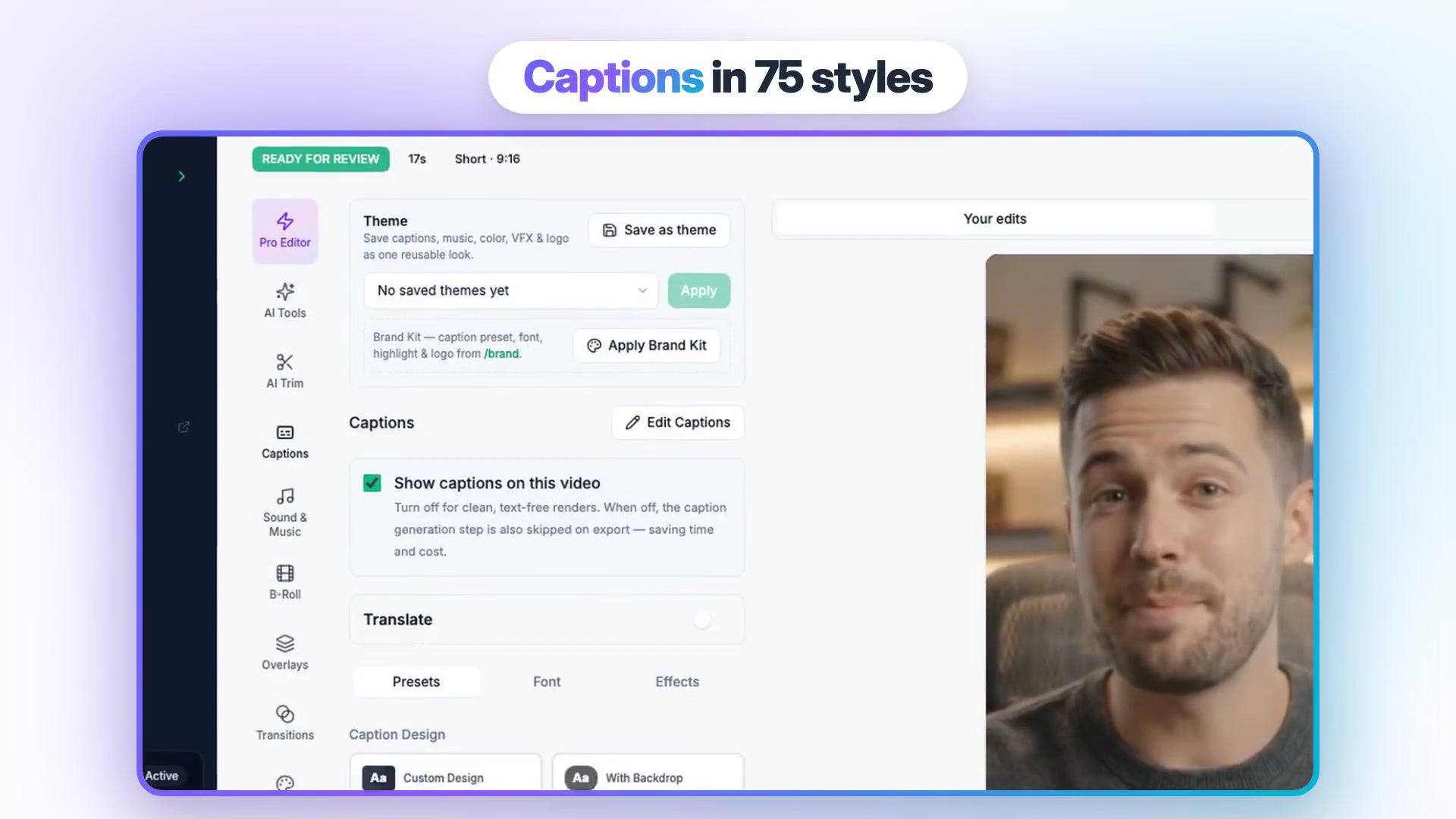
Captions are where Vidpal pulls ahead: 75 caption style presets plus animations, word-level timing, and a Brand Kit that stores your logo, colors, caption style and font and applies them to every video, so the tenth release clip matches the first. The caption panel lets you edit the words, switch presets, fonts and effects, or turn captions off. For other markets, the editor's Translate panel translates the captions and dubs the voice, with 8 dubbing languages.
The same captions work on footage you record. AI Editing takes an MP4 or MOV (from your computer, Google Drive or a phone via QR code) and adds word-level captions, removes silences and filler words, adds AI zooms, stock b-roll and sound effects, and reframes 16:9 to 9:16. That matters because many product clips are screen recordings with a human voice. On Pro and Business you then publish or schedule to Instagram, TikTok, YouTube and LinkedIn up to 90 days ahead, at no credit cost.
On Pro billed monthly, one short video costs about $0.98 (39 divided by 40); on Business about $0.69; on Starter about $1.27. Monthly credits do not roll over. Vidpal's team published its own test of 38 AI-generated Shorts on seven test channels: 13,538 views in total, a median of 36.5 per Short, and 11,026 of them from one 15-subscriber channel. Narrated, captioned Shorts can find viewers without a face, but results are uneven.
2. InVideo AI: best for AI drafts you keep editing on a timeline
InVideo now sells itself as an agentic video editor: an AI agent assembles a draft from your prompt, script, footage or an article, and you keep working on a multitrack timeline. Voices come from ElevenLabs, Minimax and other providers.
- Best for: teams that want an AI-built first cut plus a real timeline, and need voice cloning or avatars.
- Price: Starter $20/month ($10/month billed yearly, 400 credits); Plus $60/month ($30/month yearly, 2,000 credits); Max $250/month (8,000 credits).
- Watch out for: download only, since InVideo's docs say it does not post or schedule; plan credits do not roll over, and InVideo reserves the right to change credit costs without notice.
ElevenLabs narration costs about 3.2 credits per 1,000 characters; edits and exports are free. Captions are editable with an SRT download, and voice cloning (in AI twins) needs a recorded consent statement. Our Vidpal vs InVideo AI vs Pictory comparison covers these script-to-video tools in more depth.
3. Fliki: best for voice choice and narration languages
Fliki started as a text-to-speech tool, and its voice library is the largest here. It turns an idea, script, blog post, slide deck or recording into a voiced video with stock or AI visuals.
- Best for: explainer and social videos that need narration in many languages or dialects, or a cloned voice.
- Price: Free (3 credits a month, 720p, Fliki watermark, 300 voices); Standard $28/month ($21/month billed yearly, 180 credits, 1080p, 1 voice clone); Premium $88/month ($66/month yearly, 600 credits, 3 voice clones, API access). Enterprise: not published (contact sales).
- Watch out for: editing a scene's voiceover text re-charges that scene's audio, and Fliki's own FAQ and credit calculator give different figures for how many minutes 180 credits buys.
Fliki's pricing page lists 2,000+ voices, 80+ languages and 100+ dialects, and its homepage describes animated, word-by-word captions in 80+ languages styled to your brand. Dubbing costs 1 credit a minute (v1) or 6 (v2, Premium and up). Paid plans publish to YouTube and connect to Make and Zapier.
4. Synthesia: best for presenter-led training videos in many languages
Synthesia turns a script into a video with a stock or personal AI presenter, and its Syren agent drafts one from a chat prompt. It is built for training and internal communications, though Syren can output 9:16.
- Best for: L&D and product education teams that need a talking presenter and many narration languages.
- Price: Basic is free (10 minutes a month, watermarked, 9 stock avatars); Starter $19/month ($9 for the first month) or $14/month billed yearly, about 12 minutes a month; Pro $89/month ($49 for the first month) or $59/month yearly, about 60 minutes a month; Enterprise is custom.
- Watch out for: avatar footage costs about 100 credits per finished minute, and there is no social publishing, only share links.
Language coverage is its strength: 140+ languages and voices on all plans, and dubbing into 70+ languages (140+ on Enterprise) at 40 credits a minute, or 80 with lip-sync. Its pricing page does not spell out caption styling or voice cloning by plan, so confirm those in a trial.
5. HeyGen: best for talking avatars and voice cloning at scale
HeyGen is an avatar video generator with its own HeyGen Voice text-to-speech, stock and custom avatars, a Video Agent and video translation. If the video needs a face speaking your script, it is the most complete option here.
- Best for: marketers and educators who need a presenter, a cloned voice, or translated versions of the same video.
- Price: Free (3 watermarked videos a month, up to 1 minute each); Creator $29/month ($24/month billed yearly, 600 credits, 1080p); Pro $49/month ($41/month yearly, 1,000 credits, 4K); Business $149/month ($119/month yearly). Enterprise: not published (contact sales).
- Watch out for: credit cost varies by model, length and complexity, and caption styling is not covered on its pricing page.
Per HeyGen's pricing page, it covers 30+ languages on Free and 175+ on paid plans. Voice cloning starts with one clone on Free, unused credits roll over one month on monthly billing, and Business adds a brand kit and SSO. We found no direct social publishing.
6. Pictory: best for turning blog posts and documents into narrated videos
Pictory converts a script, URL, blog post, Word or PDF document, slide deck or recording into a stock-footage video with AI narration and captions.
- Best for: marketing and training teams with a backlog of written content to turn into narrated videos.
- Price: no free plan; a 14-day trial (720p, Pictory branding). Starter $29/month ($25/month billed yearly, up to 30 minutes a month); Professional $59/month ($35/month yearly, up to 90 minutes); Teams $199/month ($119/month yearly).
- Watch out for: no refunds on paid subscriptions, no direct social publishing, and projects are deleted when you cancel.
It lists 170+ ElevenLabs voices, but languages depend on the plan: 29 on Professional and Teams, 7 on Starter. Cloning starts on Professional (up to 5 clones, consent recording required). Captions export as SRT, VTT or text, handy if you also host videos in a help center.
7. Captions: best for phone-first talking-head creators
Captions, now built by Mirage, is a phone-first editor for people who film themselves: one-tap AI edits that trim filler words and pauses, eye contact correction and auto captions, plus AI Twins and AI actors.
- Best for: founders and creators who record talking-head clips on a phone and want captions and edits in one tap.
- Price: Free (60 to 200 lifetime credits, one caption template); Basic $9.99/month (200 credits); Max $24.99/month (500 credits); Frontier $69.99/month (1,400 credits). These are iOS prices, and the per-month yearly rate is not published.
- Watch out for: Captions' own pages disagree on whether free exports are watermarked and on direct publishing, and credits are forfeited if you downgrade or cancel.
It offers captions in 100+ languages, 100+ templates on paid plans and SRT download; voiceovers from ElevenLabs, OpenAI TTS and others; voice cloning; and lip-synced dubbing into 30+ languages. It suits a founder recording weekly updates on a phone.
8. VEED: best browser editor for subtitles, translation and dubbing
VEED is a browser editor with auto subtitles, translation, AI dubbing, text to speech, voice cloning and avatars, including its own Fabric 1.0 model. Its developer API covers subtitles, lip-sync and audio cleanup.
- Best for: teams editing recorded footage in a browser that need accurate subtitles and translated versions.
- Price: Free (watermark, 720p, 10 minutes of auto subtitles a month); Creator $25/month per editor ($12.25/month billed yearly); Pro $45/month ($22.08/month yearly); Studio $79/month ($38.75/month yearly). Enterprise: not published (contact sales).
- Watch out for: it is download only, since VEED's help center says you upload exported videos to other platforms yourself; billing is per seat and credits do not roll over.
Dynamic subtitles come on every plan; Creator makes auto subtitles unlimited under a 50-hour fair-use cap. Translation into 50+ languages and 30 minutes of dubbing a month start on Pro, per VEED's pricing page. "Edit with Script" cuts footage by editing the transcript.
Worked example: a 45-second release video with voiceover, captions and a dubbed copy
Here is one feature video in Vidpal, a routine a product team can repeat every sprint. Studio exports need a paid plan.
- Write about 110 words. Vidpal's guide to script length by video duration uses about 150 words a minute, so 45 seconds holds about 112. Open with the user's problem.
- Paste the script into Studio. Choose Full Script, then Short at 45 seconds in 9:16.
- Choose visuals and a voice. Stock footage suits software topics; keep one narrator for the series.
- Review the script sections. Fix wording before rendering and regenerate any image that misses.
- Render, then style the captions. Apply your Brand Kit or choose one of the 75 presets. Open Edit Captions and check every product name, acronym and number.
- Make the second-language copy. In the Translate panel, translate the captions and dub the voice into one of the 8 dubbing languages.
- Export or schedule. Export at 1080p, or on Pro and Business schedule it from the Publish panel.
A team shipping two release videos a week uses 8 to 10 credits a month: inside Starter's 15 if you share manually, or leaving Pro room for clips cut from webinars.
Caption QA checklist for product videos
- Product and feature names are spelled exactly as in your UI, every time.
- Acronyms are written the way you want them spoken.
- Numbers, prices and version strings read correctly aloud and on screen.
- No caption line sits in the bottom 35% or top 14% of the frame, where platform buttons cover it.
- The highlight color passes a contrast check against both light and dark footage.
- A native speaker watches the dubbed copy before it goes out.
How to choose a tool for AI video with voiceover and captions
Start from what the viewer sees on screen, then work back to voice and captions.
- If you publish narrated, faceless Shorts, Reels or TikToks weekly and want branded captions and scheduling in one place, choose Vidpal: Starter for 15 videos a month shared manually, Pro for scheduling.
- If the video needs a presenter's face, choose HeyGen for marketing clips and cloned voices, or Synthesia for training content with lip-synced dubbing.
- If language coverage is the hard requirement, Fliki (80+ languages, 100+ dialects) and HeyGen (175+ on paid plans) go furthest; Vidpal dubs into 8 and Studio captions are English.
- If you need your own cloned voice, look at HeyGen, Fliki, InVideo AI, Captions or VEED. Vidpal no longer offers cloning.
- If your source material is blog posts, PDFs or slide decks, Pictory handles documents and decks directly; Vidpal's Studio takes a web page URL.
- If you film yourself and need captions and cleanup, Captions suits phone-first creators, VEED browser editing, and Vidpal's AI Editing adds zooms, b-roll and scheduling.
- If you want an AI draft you then edit on a full timeline, choose InVideo AI.
Developers have one more question: can you call it from code? HeyGen, Synthesia, VEED and Fliki (Premium) publish APIs, and Vidpal works through an MCP connector in Claude and ChatGPT, covered in our guide to the best AI video tools that work with ChatGPT. If you want voice and captions inside your own product, that is a build decision our custom software development and mobile app development teams can help scope.
What to do next
Write a 45-second script for a feature you shipped this month and open a free Vidpal account to hear the voices and check caption timing on your own content. Then compare Vidpal's plans against the volume you need. If clipping long recordings matters more than narration, read our OpusClip vs Vidpal vs Vizard comparison.
Frequently asked questions
Which AI video generator has the best voiceover and captions?
For narrated short-form videos, Vidpal is the strongest all-round choice as of November 2026. It writes or takes your script, narrates it with system voices grouped by language, renders word-level captions in 75 presets, applies a Brand Kit and dubs into 8 languages, from $19 a month. Choose HeyGen or Synthesia when you need an on-screen avatar, and Fliki for the widest voice library.
Does Vidpal have voice cloning?
No. Vidpal retired voice cloning, so as of November 2026 every narration uses one of its system voices, grouped by language in Studio. If a cloned voice is essential, HeyGen includes one clone even on its free plan, Fliki includes one on Standard, and Pictory offers clones from its Professional plan. You can also record your own voice and caption it with Vidpal's AI Editing.
What are word-level captions?
Word-level captions are subtitles timed to each spoken word, so the highlighted word changes exactly when the narrator says it. They rely on per-word timestamps from a speech model, unlike classic SRT subtitles that show a block of text for a few seconds at a time. In short vertical videos they help viewers follow the narration with the sound on or off.
Can AI translate and dub a voiceover into another language?
Yes. Vidpal's editor has a Translate panel that translates the captions and dubs the voice into one of 8 languages. Synthesia dubs existing videos into 70+ languages and charges double credits for lip-sync. HeyGen covers 175+ languages on paid plans, and Fliki translates into 80+. Whichever tool you use, have a native speaker watch the dubbed version before you publish it.
Is there a free AI video generator with voiceover and captions?
Several have free tiers, and all of them watermark. Vidpal gives 4 one-time credits with no card; Auto Reels render free with a watermark, while Studio exports need a paid plan. Fliki's free plan includes 3 credits a month at 720p, HeyGen allows 3 videos a month up to a minute long, and Synthesia's Basic plan includes 10 minutes a month.
Do AI voiceovers need an AI label on YouTube?
Not automatically. YouTube asks creators to label realistic altered or synthetic content, such as a real person appearing to say something they did not, or realistic events that never happened. Using AI for scripts, captions, titles or thumbnails does not need the label on its own. If a voice imitates a real person, set AI use under Attributes in YouTube Studio when you upload.